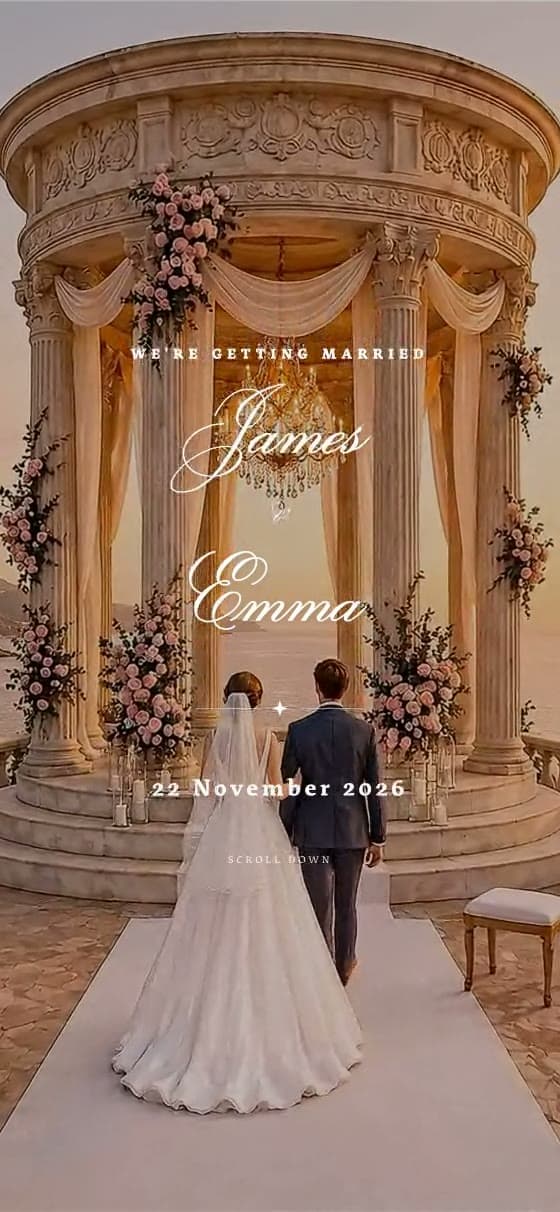

Toscana
Tuscan golden hour — vineyard hills, cypress & terracotta warmth.
Open the live demoWritten by the Wedvite foundersPrices checked 15 September 2026
A Wedvite digital save the date is one full-screen page: an envelope your guests open, your names and your date, and one tap to add the day to their calendar. It costs $19 once, for unlimited guests. The same link later becomes your full wedding invitation, and you pay the difference.
Free to design — share with your first 10 guests, no account, no card. $19 when you publish, unlimited guests.
It is the first announcement of your wedding, sent as a link rather than a card. A guest taps it, an envelope opens on their phone, and one screen tells them who is getting married and when. A digital save the date is one screen, not a website. Nothing scrolls, nothing loads a form, and there is nothing for them to install.
The words people search for are all the same object: a digital save the date, digital save the dates, electronic save the dates, save the date digital, digital save the date cards. What Wedvite sells is a page rather than an image file. The difference matters on a phone, because a page can hold a working button and an image cannot.
What a Wedvite save the date shows is deliberately short: the envelope, the full-screen hero with your names and your date, and a quiet strip underneath holding the time, the venue — tapping it opens the map — and the add-to-calendar control. That is the whole product. There is no RSVP on it, no schedule, no photo gallery, no story and no gift list, because those are the things the full invitation is for.
That limit is the point rather than a shortcoming. A save the date has one job, which is to stop the date being double-booked, and a screen carrying one sentence does that job better than a page a guest has to read. When the details are settled, the same link grows into the full digital wedding invitation — see digital versus paper if you are still weighing the two formats.
Five things, and it is worth being strict about the list. Anything else belongs on the invitation, which is still months away and will almost certainly change.
What to leave off is just as useful. No RSVP — you are not ready to count, and an early yes is worth nothing when the guest list is still moving. No dress code, no schedule, no accommodation block, no registry. On Wedvite those are not decisions you have to resist: the save-the-date product does not render them at all, so the page cannot quietly turn into a half-finished invitation.
The venue line is optional and often the honest thing to leave blank. If the contract is not signed, put the city in and change it later — the link is live and editable, so every guest who already saved it sees the update without you re-sending anything. If you want the full checklist of what eventually goes on the invitation itself, what to include on a wedding website covers it section by section.
Open one on your phone. These are live invitations, not screenshots — so they open the way a guest's would, with the envelope and the full-screen hero. Read them as the design: the demos are the complete invitation, and a save the date is its first screen plus the details strip, with the sections below it switched off.
Six to nine months before the wedding is the ordinary answer, and nine to twelve months is the right one if guests will need flights, a passport or a hotel over a holiday weekend. Send earlier than twelve months and people forget; send later than four and the save the date has stopped being useful, because you will be sending the invitation soon afterwards.
Digital changes the arithmetic at the late end rather than the early end. A printed save the date has to be designed, proofed, printed and posted, so the decision is made weeks before the card lands. A link is live the moment you publish it, which means a date fixed on a Tuesday can be in your guests' calendars on the Tuesday. That is the one real advantage of the format, and it is worth spending on a short list rather than a long one.
The other rule that catches couples out: everyone who gets a save the date must get an invitation. It is a promise, not a poll. Count the list before you send. When to send save the dates works through the timings month by month, including destination weddings and the case where you skip the save the date altogether, and when to send wedding invitations picks the story up at the invitation.
Short. A save the date is one sentence and two proper nouns, and the temptation to write a paragraph is the main thing to resist. Two that work on a phone screen:
Save the date — Amara & Daniel are getting married on 14 June 2027 in Lisbon. Invitation to follow.
We have set a date. Priya & Tom, 3 October 2027, Edinburgh. Keep the weekend free — everything else to follow.
Two habits to avoid. Do not write "please save the date" and then add a time, a dress code and a hotel: you are writing an invitation and it will be out of date before it is read. And do not put a deadline on it — there is nothing to reply to, so a date in the corner only makes guests think they have missed something.
If you want more to choose from, including wording for a destination wedding, a second marriage and a date you have not fully fixed, save the date wording has examples you can copy, save the date ideas runs through the formats and creative angles the words sit on, and wedding invitation wording covers the formal lines you will need later.
Ours is $19, paid once, for any number of guests. Across the services in that table the published figures run from nothing at all to $1.44 USD a guest, so the number that decides it is your guest count, not the headline price. Every competitor figure here was read from the vendor's own page on 15 September 2026.
Printed save the dates price per card and then again for postage, which is why the digital versions exist. On 15 September 2026 Zola's paper save the dates were from $0.99 each on a 20-card minimum, and Bliss & Bone's printed ones from $235 for 25 cards — with postage on top of both. A hundred links costs the same as ten. What wedding invitations cost sets paper and digital against each other for a full guest list.
| Service | Published price for a digital card | Free option | Animated envelope | Text or WhatsApp delivery |
|---|---|---|---|---|
| Zola | Free — per design, shared by link/text/email/DM (1,895 free designs) | Yes — No hidden fees or hurdles to get started... The only exception is if you want a custom domain | No | Partly |
| Joy (withjoy.com) | Free — per card, no minimum order (limited editing options, fewer designs) | Yes — Joy wedding websites, planning tools, registry, and online RSVP are free! | Partly | Partly |
| Bliss & Bone | $1.20 / $0.90 / $0.70 — per recipient — same three volume tiers as invitations (1–9 / 10+ / 300+) | Partly — Customize any design fully and preview the exact invitation your guests will receive before you spend… | No | Yes |
| Paperless Post | $0.00 / $0.50 USD / $1.05 USD / $1.44 USD per guest by feature set; we did not verify a separate save-the-date price on 15 September 2026 | Yes — the first 50 invitations sent via email or phone number directly through the Paperless Post site can be sent… | Yes | Partly |
| Minted | Free — per invitation design, emailed or shared by link; no per-guest fee published | Yes — Free wedding websites include multiple layouts, event RSVPs, gift registries, maps and directions, a wedding… | No | Partly |
| Wedvite | $19 flat, paid once, unlimited guests | Partly — design it free and share with your first 10 guests, then pay once | Yes | Yes — you share one link by WhatsApp, text or email |
Read that table honestly: 4 of the 5 other services in it publish a free option of some kind, so $19 is not the cheap option and we are not pretending it is. What the fee buys is the envelope animation, a full-screen video hero, a page with no advertising and no account for your guests, and a link that later becomes the invitation instead of being thrown away.
Design the whole thing before you decide.
no account · no card
One announcement — sealed, opened, saved to every calendar.
one-time · unlimited guests · no per-guest fees
Everything your wedding day needs — on the same link.
SUMMER45 auto-applied
Already have a save the date? You pay the difference between the two list prices — $70 — never the invitation price twice.
Create the invitationYes, and they are worth knowing about before you spend anything here. Zola publishes free digital save the dates, and Joy's Basic digital cards are free with no minimum order. Minted publishes free Online Invitation designs, and Paperless Post's own free tier covers, in its words, "the first 50 invitations sent via email or phone number directly through the Paperless Post site can be sent without purchase". All four were read from the vendors' own pages on 15 September 2026. If the only requirement is that a date reaches your guests at no cost, those are real answers and you should take one.
Wedvite is not free, and the free stage we do have is a different shape. You can design your save the date completely — choose the design, type your names and your date, open the envelope, tap the calendar button — with no account and no card, and share that link with your first 10 guests. Publishing it for everyone is $19. So the free part is the whole product for a handful of people, not a limited version for all of them.
The reason to pay is narrow enough to state plainly. You are buying motion and quiet: an envelope that opens, a full-screen video design behind your names, no advertising anywhere near it, no account for guests to create, hosting through your wedding date and at least 90 days after, and a link that becomes the invitation rather than being replaced by one. If none of that is worth $19 to you, the free cards above do the announcing perfectly well.
The save the date and the invitation are the same link. When your details are settled, that page stops being a hero-only announcement and turns into the full invitation — the schedule, the venue with its map, the live RSVP with a guest-messages dashboard, the photo gallery, your story and background music — at the same address every guest already saved.
You pay the difference between the two list prices, not the invitation price a second time: that is $70. The policy itself has no expiry — the amount simply follows whatever the invitation costs on the day you upgrade.
Be clear about how it happens, because there is no button for it yet. Message us on Instagram — the handle and your order number are both in your receipt — and we move your invitation across by hand and send you the payment link for the difference. A person does it, so it is not instant. We would rather say that than put a one-click promise on a page and make you find out otherwise.
Two details worth knowing. Your guests keep the address they saved, so nobody needs a second link, and the calendar entries they already created stay pointing at the same page. And everything you typed into the save the date — names, date, time, venue — is already there when the invitation opens, so you are adding sections rather than starting again. Invitations with RSVP built in shows what the RSVP side looks like once it is switched on.
Two buttons sit in the strip under your names, and the guest picks. Google opens Google Calendar with the event already filled in. Apple · Outlook downloads a standard .ics file, served from your own link as a real text/calendar URL, which is what makes iOS show its own native add-event sheet rather than a download it cannot use.
The event carries your names, the date, the time and the venue. It is written as a floating local time — no timezone stamped on it — which means a 5 pm wedding shows as 5 pm in every guest's calendar, the same hour your invitation prints, instead of being shifted by wherever they happen to be. If you have not set a time yet, the entry is created as an all-day event; if you have set a start but no end, the calendar entry runs four hours, because calendars insist on an end time even when an invitation does not print one.
This is the part that makes a digital save the date worth more than a picture of one. A card gets photographed and lost in a camera roll. A calendar entry survives the months between the announcement and the wedding, which is the only job you actually gave it.
The save the date is sold on the 12 portfolio designs. Open any of them and tap through exactly as a guest would — the envelope and the hero you see are the two things your save the date renders. The wider catalogue is at wedding invitation templates.
A regal invitation in warm ivory and soft umber with gold-script elegance.
View live demoA painterly dusk invitation that develops from day into night in warm cream and olive-sage.
View live demoAn opulent cream-and-gold invitation with a crystal-chandelier ballroom and ornate detailing.
View live demoTuscan golden hour — vineyard hills, cypress & terracotta warmth.
View live demoAegean island — whitewash, cobalt domes & bougainvillea.
View live demoTropical destination — palms, warm sand & sunset coral.
View live demoEnglish garden — watercolor roses, trellis greens & ivory.
View live demoCherry-blossom minimalism — drifting petals & ink-brush calm.
View live demoArt-deco ballroom — Gatsby gold geometry on velvet noir.
View live demoLavender fields — French pastoral, linen & wildflowers.
View live demoGarden estate — a painted villa that drifts from daylight into evening, gold engraving on cream.
View live demoIvory & burgundy ballroom — draped arches, deep red roses and candlelight.
View live demoYou send it yourself, which is simpler than it sounds. Publishing gives you one link. Paste it into a WhatsApp group, a text, an Instagram message or an email, and it unfurls into a preview card showing your design's envelope rather than arriving as a bare address. There is no guest list to upload here, nobody's phone number to collect, and no per-recipient fee waiting at the end of it.
Two consequences of that, one good and one worth planning for. The good one: the link works everywhere at once, so a family group chat does the distribution for you. The one to plan for: because we do not send on your behalf, nothing on our side tells you who opened it. If knowing that matters to you, a save the date is the wrong tool — the RSVP on the full invitation is the thing that actually reports back.
Sending wedding invitations over WhatsApp covers the practicalities — group etiquette, what the preview card looks like, and reaching guests who never open email.
An electronic save the date is the same thing as a digital one: the announcement arrives as a link in a message instead of a card in the post. A Wedvite one opens into an envelope, then one full screen with your names and your date, the time and the venue, and two buttons that add the day to Google, Apple or Outlook calendars. It costs $19 once for unlimited guests, and your guests need no app and no account to open it.
An online save the date is a page with its own web address, which is what separates it from an image file. Because the page is live, you can change it after sending: a new venue or a later time shows to every guest the next time they open the link, without sending anything again (calendar entries guests already saved keep the old details, so tell them if the time moves). You share that one link yourself, by WhatsApp, text, Instagram or email. When the details are settled, the same link becomes your full invitation and you pay the difference between the two prices.
Every quote is a real message a couple sent us on their delivery day.
The whole thing is a masterpiece — and the colour palette you made is absolutely gorgeous. I'll go recommend you everywhere.
Our guests loved it so much — everyone who asks me about it, I send them straight to this studio.
Honestly I could cry, it's so beautiful.
So, so beautiful. Now it's perfect — thank you, you really went above and beyond.
Thank you for your work and lovely attitude — keep going ❤️
The invitation is stunning — it doesn't need a single edit. May your project keep growing, all the way worldwide.
Honestly — a masterpiece, a masterpiece, a masterpiece. Everything is stunning. Bless your hands.
I gave you such a hard time, but honestly I loved everything. And thank you for the beautiful message in the website.
A masterpiece, a masterpiece. Bless your hands — I put you through so much.
I'm so excited to see my sister's reaction — I wanted to surprise her with the design I fell in love with.
A masterpiece in every sense of the word — even more beautiful than I imagined, and not a single mistake in it.
It looks amazing honestly. So elegant.
Honestly, I don't even know what to say to you. Amazing.
Love the new version!! So much better. I love it.
A digital save the date is a web page instead of a card: one link that opens into an envelope, then a full screen carrying your names and your wedding date. On Wedvite it also shows the time and the venue, with one tap to add the day to a guest's calendar. It costs $19 once, for any number of guests.
Wedvite charges $19 once for the save the date, whatever the size of your guest list, and you can design the whole thing and share it with your first 10 guests before paying anything. Some services publish free digital cards instead — Zola and Joy both do — so the range runs from nothing at the bottom to $1.44 USD a guest at the top, which is Paperless Post's All Access feature set. Every figure in that range was read from the vendor's own page on 15 September 2026.
Yes. Zola publishes free digital save the dates and Joy's Basic digital cards are free, both checked on 15 September 2026. Wedvite is a paid product: the design stage is free and you can share it with your first 10 guests, then it is $19 to publish for everyone. What you buy is the animated envelope, the full-screen hero and a page with no advertising on it.
Six to nine months before the wedding suits most couples, and nine to twelve months suits a destination wedding, a holiday weekend or a guest list that will need to book flights. A digital save the date can be sent later than a printed one, because there is no printing or postage between you and your guests.
Yes, in one tap. Two buttons sit under your names: Google, which opens Google Calendar with the event already filled in, and Apple · Outlook, which downloads a standard .ics file. The event is written as a floating local time, so it shows the same hour your invitation prints rather than shifting by timezone.
Yes, on the same link. When the details are settled, message us on Instagram and we move your save the date up to the full invitation — schedule, venue map, RSVP, gallery, story and music — and you pay the difference between the two prices rather than the invitation price again, which is $70 at the invitation price shown on this page today. There is no self-serve upgrade button yet, so a person does it.
Save the date.
Design it free, publish for $19, and your date is in your guests' calendars tonight.