WhatsApp wedding invitationsguests actually open
To send a wedding invitation on WhatsApp, skip the blurry JPG and the clunky PDF: send a link. A Wedvite invitation is one link that unfurls into a rich preview card in the chat, opens instantly in any phone's browser, plays your envelope animation, and collects RSVPs — for $89 once, unlimited guests. Below: exactly how to send it, what guests see, and copy-paste message templates that work.
How do you send a wedding invitation on WhatsApp?
- 1
Create your invitation
Pick a design, type your names, and edit every word directly on the page — date, venue, schedule, gallery, music. Free to start, no account needed.
- 2
Share free, then publish
Share your link free with your first 10 guests — they can open it and RSVP for real. Publish and you get one short wedvite.net link that opens for everyone; there's no file to export, compress or attach.
- 3
Paste it into any chat
Drop the link into a WhatsApp group or individual chats. It unfurls into a rich preview card — your envelope design and names — so it arrives looking like an invitation, not a URL.
- 4
Watch RSVPs arrive
Guests tap, the envelope opens, they RSVP and leave a wish. Every response lands in your live dashboard the moment it's submitted.
What does the invitation look like in WhatsApp?
In the chat, your link renders as a rich preview card: a thumbnail of your sealed envelope with your names on it, above your message. That first impression matters — it reads as an invitation arriving, not a URL to be suspicious of.
When a guest taps, the invitation opens full-screen in their browser. The envelope breaks open, your chosen music starts, and the invitation unfolds — names, countdown, story, gallery, schedule, venue map, RSVP. It behaves like a small film, not a static card, and it works identically on iPhone, Android and desktop.
Because it's a link and not a file, it never degrades: no compression artifacts, no "download failed", no 20-person forward limit on a heavy video file. Forwarding the invitation forwards the full experience.
Can you post your wedding invitation to your WhatsApp status?
Yes — and there is nothing to design. Every Wedvite invitation comes with a free poster made from it: your envelope, your names in the invitation's own typeface, the date, the venue, and a QR code. It is sized for WhatsApp status and sits just as well in a group chat.
The poster announces; the invitation does the rest. Guests who see it scan the QR and land on the full invitation — the envelope opening, the music, the schedule, the map and the RSVP.
You make it in the editor, in your invitation's language (right-to-left Arabic included), and share it straight from your phone. Until you publish, anyone who scans it sees that your invitation is almost ready; it opens for everyone the moment it goes live.
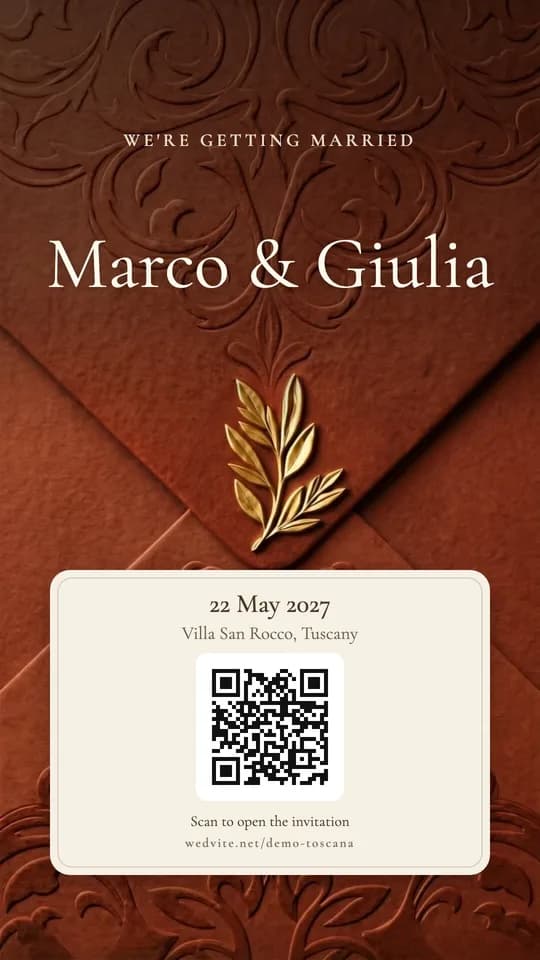
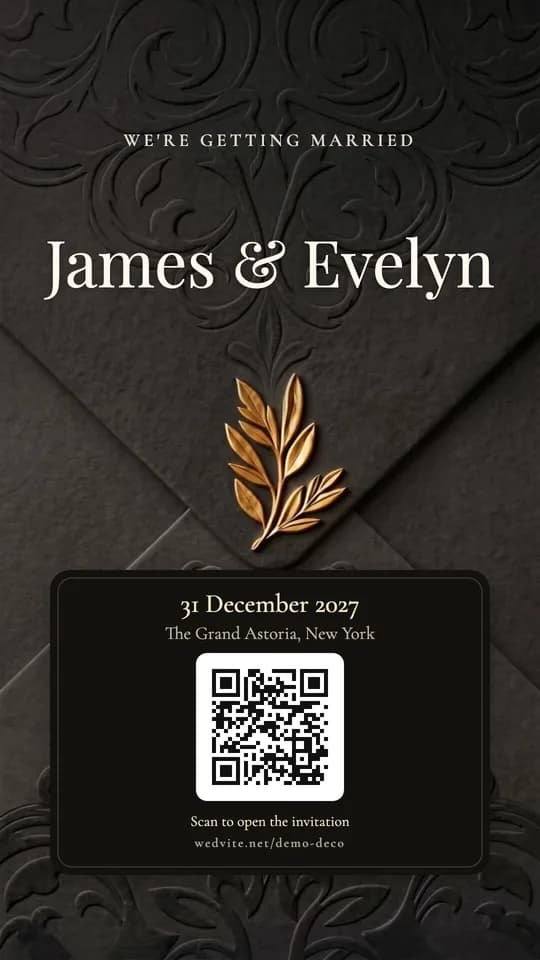
Scan either poster with your phone — each opens the live demo it was made from.
Can guests RSVP over WhatsApp?
Better — they RSVP from WhatsApp, without the answers drowning in the group chat. The RSVP form lives on the invitation itself: guests tap your link, confirm attendance and party size, and leave a personal wish. No account, no app, about ten seconds.
Every response streams into your live dashboard in real time, so you always have an exact headcount for the caterer — instead of scrolling three group chats counting thumbs-up reactions. You can watch wishes arrive on the morning of the wedding, too; couples tell us it's their favorite part.
And when details change — they always do — you edit once and the same link updates for everyone. No "please ignore the previous message" in the family group.
What should you write in a WhatsApp wedding invitation message?
Keep it short, warm, and end with the link — the invitation itself carries the details. Five templates to start from; swap the brackets for your own words.
Together with our families, we joyfully invite you to our wedding. 💍 [Names] [Date] · [Venue, City] Tap to open your invitation and RSVP: [Your invitation link]
Hi [Name]! We're getting married 🤍 It would mean the world to have you with us on [Date] in [City]. All the details — venue, schedule, RSVP — are in our invitation: [Your invitation link]
Dear family ✨ The date is set! [Names] are getting married on [Date] at [Venue]. Open the invitation for directions, the full schedule, and to RSVP: [Your invitation link] Please reply by [RSVP deadline]. This invitation is for [invited names].
Save the date! 📅 [Names] — [Date] — [City] Full invitation to follow, but lock it in now: [Your invitation link]
Hi [Name]! A gentle nudge — we're finalizing numbers with the caterer this week. Could you RSVP when you get a second? It takes 10 seconds: [Your invitation link] Thank you! 🤍
Sending to elders or formal guests in another language? Wedvite invitations are offered in 11 languages — write the WhatsApp message in whichever language fits the chat, and the link opens in the right one.
Sending a whole week rather than one day? See mehndi, sangeet and haldi invitation wording for the combined card and the WhatsApp message that carries it.
Why is a link better than a PDF or an image?
- WhatsApp compresses images hard — the JPG you spent hours on arrives blurry, with your names barely readable.
- A PDF opens in a viewer, not a browser: no music, no animation, no RSVP button, and on many phones it downloads before it opens.
- Files are frozen. If the venue or time changes, you're re-sending and hoping everyone sees version two. A link updates in place.
- Files can't count. A link collects RSVPs and wishes into a dashboard; a JPG collects thumbs-up emojis you'll have to tally by hand.
Comparing services? See how Wedvite stacks up against Paperless Post, Greenvelope and Evite, or see full pricing.
The current catalog spans more than 30 designs — from Toscana's vineyards and Santorini's blue domes to Sakura, Deco, Provence, Royal, Imperial, Aurora's northern lights and a full Gulf collection — every one editable word-by-word before you pay.
Other ways to send the same link
It is one link, so it works anywhere you can paste text. You send it yourself, from your own phone or email account — Wedvite never sends anything to your guests.
By text message
Paste the link into a text from your own phone. Guests tap it and the invitation opens in their browser.
By email
Put the link in an email you write from your own account. One email or a hundred, it is the same link.
As a link, anywhere
What the link is, what guests see when they open it, and how their RSVPs come back to you.
The WhatsApp message
More wording for the message that carries the link, beyond the examples on this page.
The questions everyone asks.
How do I send my wedding invitation on WhatsApp?+
Do guests need to download an app to open the invitation?+
Will my invitation show a preview image in the chat?+
Can guests RSVP through WhatsApp?+
Is a link better than sending a PDF or an image on WhatsApp?+
Can I make an image of my wedding invitation for my WhatsApp status?+
How much does a WhatsApp wedding invitation cost?+
Can the invitation be in more than one language?+
Your invitation, one tap away.
Pick a design, type your names, paste the link in your group chat tonight. $89 once — unlimited guests, free to draft.
Start your invitation